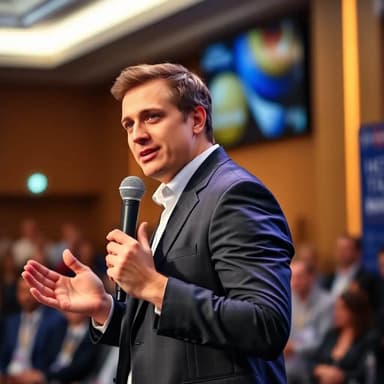
Professional Tech Headshots for Engineers, Founders, and Speakers
Create a recognizable, modern portrait for LinkedIn, GitHub, company pages, investor updates, and conference speaker profiles.

Tech Industry Professional Excellence
Create a credible technology professional portrait in a modern workspace. Use a chest-up composition, clean business-casual clothing, a focused approachable expression, neutral daylight with a subtle cool accent, and practical workstations in soft focus. Avoid holograms, glowing code, unreadable interfaces, devices held as props, and science-fiction styling.
Showcase your tech expertise with an innovative professional headshot from HeadShots.fun AI. Our technology creates cutting-edge environments, positioning you as a forward-thinking leader in the technology sector. Perfect for IT company websites, tech conference speaker profiles, and industry publications.
Key Advantages of Our AI Headshot Generator for Tech Industry Professional
- AI Headshots Tailored for Tech Industry Professional Professionals
- High-Quality AI-Generated Headshots
- Versatile AI Portraits for Digital and Print
- Instant AI Headshot Creation in 30 Seconds
- Cost-Effective AI Headshot Solution
What should a professional tech headshot look like?
A strong tech headshot is current, recognizable, and easy to reuse. It communicates competence through a clear expression, good light, and intentional styling—not laptops, fake code, neon server rooms, or exaggerated futuristic effects. Start with the audience you need to trust you, then choose the simplest setting that supports that relationship.
One portrait system for your professional presence
Generate a neutral master portrait first, then make crops and a small number of role-specific variations.
Software engineer and data profiles
Use a clean square crop and a neutral or softly blurred workspace. It stays legible on GitHub, LinkedIn, team directories, and community profiles without relying on visual tech clichés.
Startup founder and executive pages
Choose a confident, approachable expression and clothing that matches customer and investor meetings. Keep a little room around the shoulders for press, pitch deck, and company-site crops.
Conference and podcast speaker bios
Use a high-resolution chest-up portrait with simple edges and strong contrast. Event teams can place it on light or dark schedules, banners, and promotional cards more easily.
Review for likeness before polish
A professional profile is an identity surface. Pick the result that colleagues recognize fastest, even if another variation looks more dramatic. Compare the image at thumbnail size and at full resolution before publishing it.
Need a general networking crop? Read the selfie-to-LinkedIn headshot guide.
- Your current face, hair, glasses, age, and skin tone remain recognizable.
- Eyes, teeth, ears, clothing seams, and background details have no artifacts.
- The image works as a small circular avatar as well as a larger speaker portrait.
- The clothing and setting fit your real role instead of a generic tech stereotype.
- You keep a neutral master image for future platform-specific crops.
Tech professional headshot questions
What makes a good headshot for a software engineer?
Use a recent, recognizable likeness, a relaxed but attentive expression, clean smart-casual clothing, and an uncluttered neutral or modern-office background. The image should still read clearly as a small GitHub, LinkedIn, Slack, or conference avatar.
Should a tech headshot include a laptop or code background?
Usually not. Devices, code screens, neon effects, and server-room backgrounds can look generic or introduce AI artifacts. A restrained portrait keeps attention on your face and works across more employers, clients, and speaking events.
What should a startup founder wear for a headshot?
Match the people you need to build trust with. A plain shirt, knit layer, or unstructured jacket works for most product and engineering contexts. Choose a more formal jacket for investor, enterprise, or press use when that reflects how you actually present yourself.
Where can I use a professional tech headshot?
Use a consistent crop on LinkedIn, GitHub, company About pages, conference speaker profiles, press kits, professional communities, portfolio sites, and internal directories. Keep a high-resolution original for future crops.
How do I review an AI-generated professional photo?
Check that your face, age, hair, glasses, and skin tone remain accurate. Inspect teeth, pupils, ears, clothing seams, devices, and background text for artifacts. Do not publish a result that colleagues would not immediately recognize.
Create AI Headshots in 3 Simple Steps
The fastest AI headshot generator – create stunning, personalized professional headshots for LinkedIn, resumes, and every occasion.
Upload Your Selfies
Upload 1-5 clear selfies or photos showcasing your face in various settings.
Personalize Your Style
Select from diverse styles or create custom prompts for truly unique AI headshots.
Instant AI Magic
Our advanced AI headshot generator creates pro-quality headshots in seconds, ready for any use.